How to Craft Jungle Hanging Sign in Minecraft
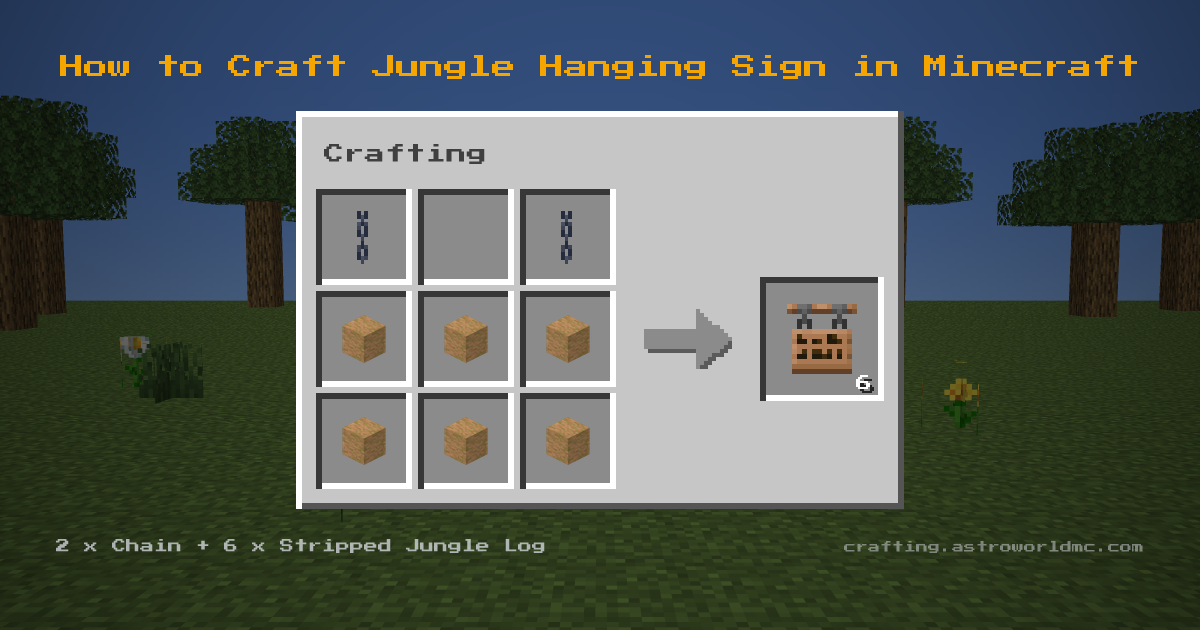
Stand at a Crafting Table with 2 Chains and 6 Stripped Jungle Logs and you can make Jungle Hanging Signs. Laid out, that is two Chains side by side in the top row and six Stripped Jungle Logs in a solid 2x3 block in the middle and bottom rows. Expect 6 Jungle Hanging Signs from every craft. As fuel these are worth 200 ticks apiece: 64 of them clear a stack of 64.
Jungle Hanging Sign Item ID and Give Command
The item ID for Jungle Hanging Sign is minecraft:jungle_hanging_sign. In commands the namespace may be left off, so jungle_hanging_sign works too. Checked against Minecraft Java 26.3.
- Give yourself one
/give @p jungle_hanging_sign- Give a full stack of 16
/give @p jungle_hanging_sign 16- Give it to a named player
/give Steve jungle_hanging_sign 1
Cheats have to be on for Jungle Hanging Sign to appear this way, and the same command works on Bedrock Edition, where the name is written the same.
Overview
Jungle Hanging Signs display text while hanging from blocks or chains. They swing slightly when placed. Jungle Hanging Sign uses a shaped recipe: the ingredients only work in the pattern shown.
This recipe first appears in the game's own data files in Minecraft 1.20, and not in the release before it. The recipe itself last changed in Minecraft 1.21.9. Guides written before that release show a different set of ingredients for the jungle hanging sign, so check the grid above rather than the video.
The materials come together from a few sources: you will be working with chain (craft from iron nuggets and iron ingot) and stripped jungle log (use axe on jungle log).
Counting The Stack
Stack sum: 64 over 6 is 10 crafts, times 6 is 60 jungle hanging signs. Have 20 chains ready as well. Left behind: 4 stripped jungle logs.
Materials Needed
For Jungle Hanging Sign: 2x Chain (craft from iron nuggets and iron ingot) and 6x Stripped Jungle Log (use axe on jungle log), brought to a Crafting Table.
Step-by-Step Instructions
- 1
 2x Chain
 - 2
6x Stripped Jungle Log
- 3
6x Jungle Hanging Sign

Tips & Notes
- One craft costs 2x Chain and 6x Stripped Jungle Log. Start with the Chain: craft from iron nuggets and iron ingot.
- You get 6 Jungle Hanging Sign per craft, so divide whatever you need by 6 to know how many times to repeat it.
Uses for Jungle Hanging Sign
- Displaying text while hanging
- Aesthetic sign placement
View detailed item stats, durability and properties for Jungle Hanging Sign on the Astroworld Items Database.
Frequently Asked Questions
What do I need to craft a Jungle Hanging Sign in Minecraft?
Where do you find the materials for a Jungle Hanging Sign?
How many Jungle Hanging Signs do you get from one craft?
What is the item ID for Jungle Hanging Sign in Minecraft?
What is the give command for Jungle Hanging Sign?
Is the Jungle Hanging Sign recipe the same in Java and Bedrock Edition?
Which material does a Jungle Hanging Sign need the most of?
What version of Minecraft added the Jungle Hanging Sign?
Sources
- Grid, ingredients and yield
- 2 Chains and 6 Stripped Jungle Logs in, 6 Jungle Hanging Signs out, Crafting Table. Java 26.3, .
- That Bedrock agrees
- Bedrock 1.26.50.4, same 2 ingredients.
- How far back it goes
- Present in Minecraft Java 1.20, missing from the release immediately before. From all 163 released Java clients, rd-132211 to 26.2.
- When the recipe last changed
- Every Java release since 1.13 was checked in order, 50 of them, and 1.21.9 is where this recipe last changed.
- Stack size, burn time
- The Astroworld Items Database, built from the same jar.
- The recipe book unlock
- What unlocks it in the recipe book. Java 26.3.
- The stack sum
- Counted, not played: 6 Jungle Hanging Signs per craft against the stack size.
Related Recipes


