How to Craft Dark Oak Hanging Sign in Minecraft
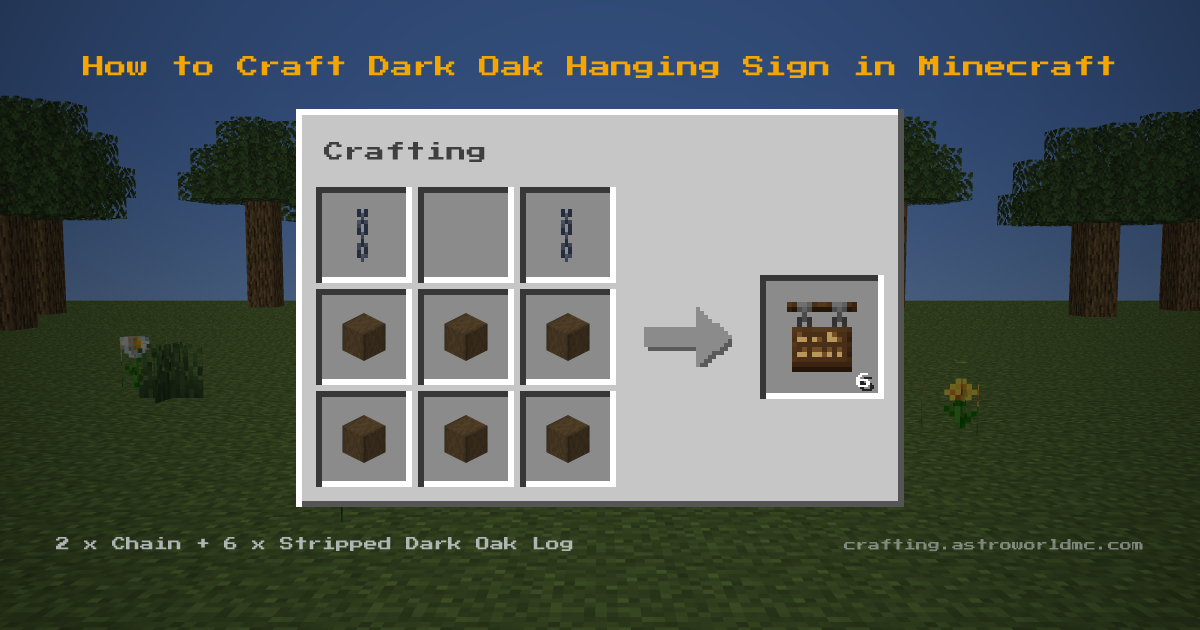
Gather 2 Chains and 6 Stripped Dark Oak Logs, then work it on a Crafting Table. Its pattern is two Chains side by side in the top row and six Stripped Dark Oak Logs in a solid 2x3 block in the middle and bottom rows. Each attempt hands back 6 Dark Oak Hanging Signs. Short on coal? 200 ticks each means 64 Dark Oak Hanging Signs smelt 64 items.
Dark Oak Hanging Sign Item ID and Give Command
The item ID for Dark Oak Hanging Sign is minecraft:dark_oak_hanging_sign. In commands the namespace may be left off, so dark_oak_hanging_sign works too. Checked against Minecraft Java 26.3.
- Give yourself one
/give @p dark_oak_hanging_sign- Give a full stack of 16
/give @p dark_oak_hanging_sign 16- Give it to a named player
/give Steve dark_oak_hanging_sign 1
Cheats have to be on for Dark Oak Hanging Sign to appear this way, and the same command works on Bedrock Edition, where the name is written the same.
Overview
Dark Oak Hanging Signs display text while hanging from blocks or chains. They swing slightly when placed. Dark Oak Hanging Sign uses a shaped recipe: the ingredients only work in the pattern shown.
This recipe first appears in the game's own data files in Minecraft 1.20, and not in the release before it. The recipe itself last changed in Minecraft 1.21.9. Guides written before that release show a different set of ingredients for the dark oak hanging sign, so check the grid above rather than the video.
The materials come together from a few sources: you will be working with chain (craft from iron nuggets and iron ingot) and stripped dark oak log (use axe on dark oak log).
What A Stack Yields
10 crafts drain a stack: 64 stripped dark oak logs become 60 dark oak hanging signs. You supply 20 chains to go with it. Left over: just 4 stripped dark oak logs.
Materials Needed
To make Dark Oak Hanging Sign you will gather 2x Chain (craft from iron nuggets and iron ingot) and 6x Stripped Dark Oak Log (use axe on dark oak log), and craft them at a Crafting Table.
Step-by-Step Instructions
- 1
 2x Chain
 - 2
6x Stripped Dark Oak Log
- 3
6x Dark Oak Hanging Sign

Tips & Notes
- One craft costs 2x Chain and 6x Stripped Dark Oak Log. Start with the Chain: craft from iron nuggets and iron ingot.
- You get 6 Dark Oak Hanging Sign per craft, so divide whatever you need by 6 to know how many times to repeat it.
Uses for Dark Oak Hanging Sign
- Displaying text while hanging
- Aesthetic sign placement
View detailed item stats, durability and properties for Dark Oak Hanging Sign on the Astroworld Items Database.
Frequently Asked Questions
What do I need to craft a Dark Oak Hanging Sign in Minecraft?
Where do you find the materials for a Dark Oak Hanging Sign?
How many Dark Oak Hanging Signs do you get from one craft?
What is the item ID for Dark Oak Hanging Sign in Minecraft?
What is the give command for Dark Oak Hanging Sign?
Is the Dark Oak Hanging Sign recipe the same in Java and Bedrock Edition?
Which material does a Dark Oak Hanging Sign need the most of?
What version of Minecraft added the Dark Oak Hanging Sign?
Sources
- Grid, ingredients and yield
- 2 Chains and 6 Stripped Dark Oak Logs in, 6 Dark Oak Hanging Signs out, Crafting Table. Java 26.3, .
- That Bedrock agrees
- Bedrock 1.26.50.4, same 2 ingredients.
- How far back it goes
- Java 1.20 is the first release that knows this recipe at all. From all 163 released Java clients, rd-132211 to 26.2.
- When the recipe last changed
- Every Java release since 1.13 was checked in order, 50 of them, and 1.21.9 is where this recipe last changed.
- Stack size, burn time
- The Astroworld Items Database, built from the same jar.
- The recipe book unlock
- What unlocks it in the recipe book. Java 26.3.
- The stack sum
- Counted, not played: 6 Dark Oak Hanging Signs per craft against the stack size.
Related Recipes


